SW on Mac

Star Wars gameson Apple SiliconMacs.

Two free apps for Apple Silicon Macs. SWTOR on Mac speeds up the official SWTOR Mac app by sending its Direct3D 9 straight to Metal. SWGL on Mac runs SWG Legends, which has no Mac version of its own.

  • FREE
  • OPEN SOURCE · ZLIB
  • SIGNED & NOTARIZED

Star Wars: The Old Republic · official Mac app, accelerated

SWTOR on Mac

The official SWTOR Mac app draws the game through OpenGL on an older Wine. SWTOR on Mac swaps that for d9mt, which sends the game's Direct3D 9 straight to Metal, on a newer Wine.
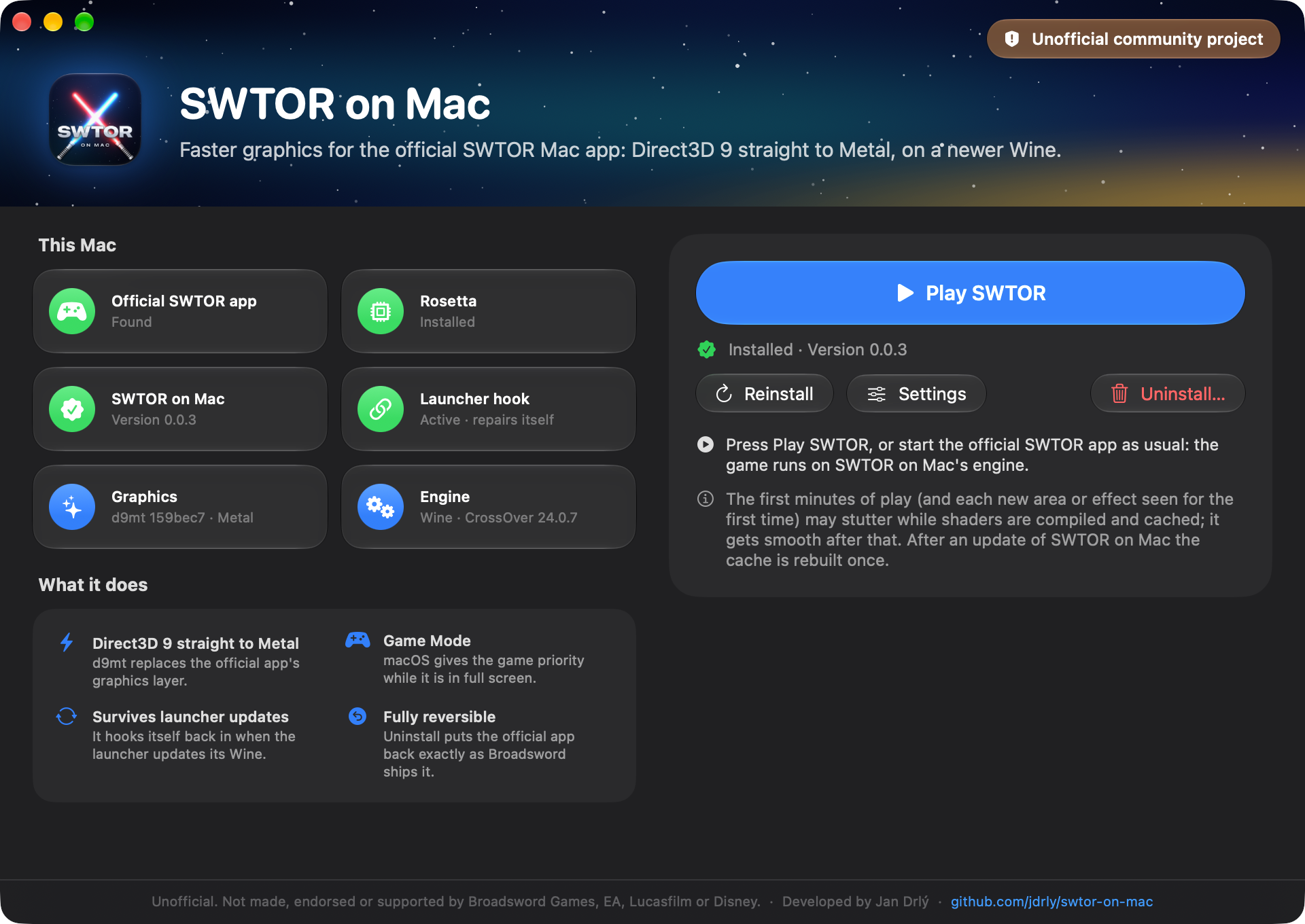
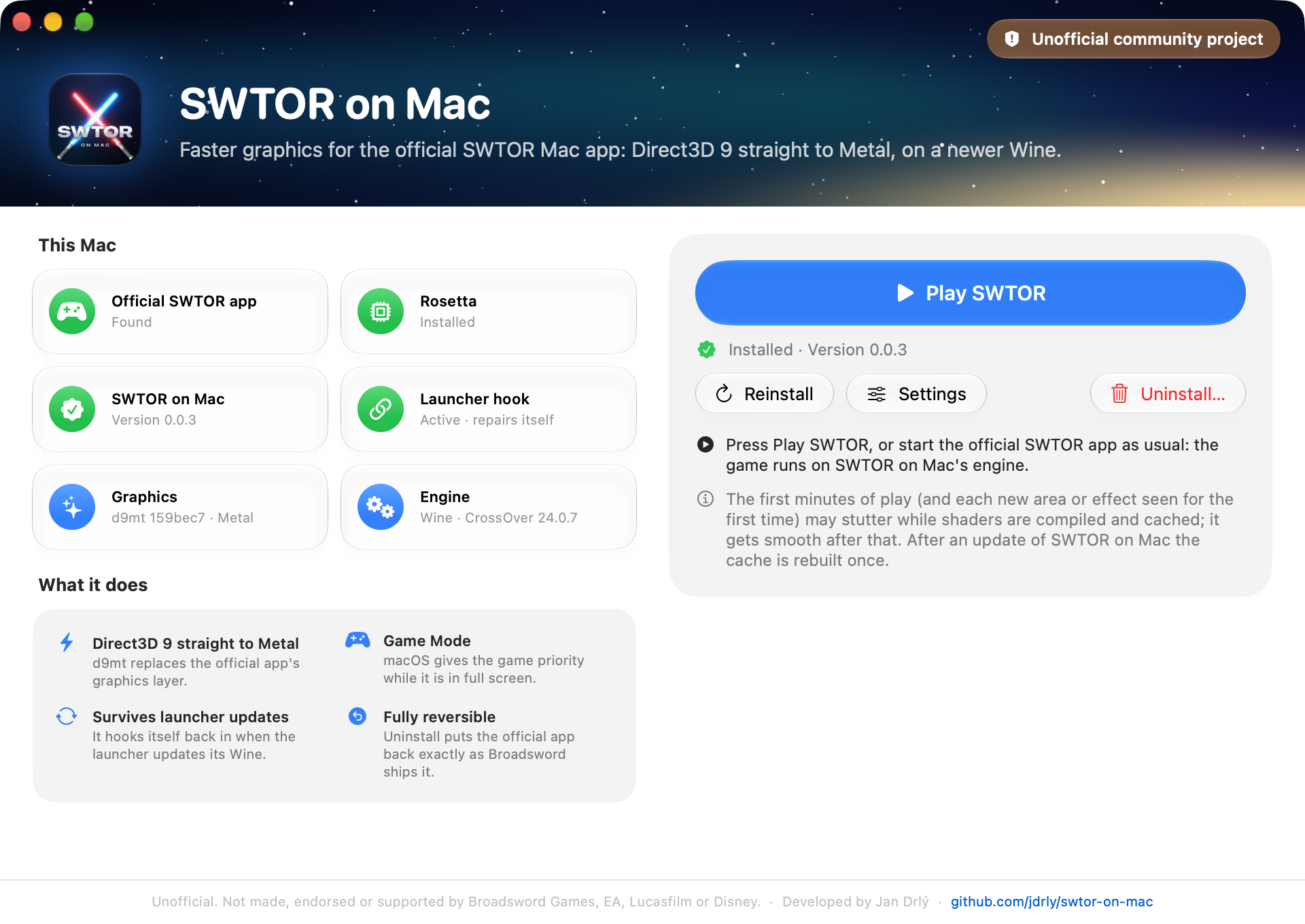
SWTOR on Mac · status: installed
The SWTOR on Mac window after an install, with the Play SWTOR button

Telemetry · median FPS

Sample data

Official app
31FPS
SWTOR on Mac
60FPS

Same Mac, same scene.

System requirements

Chip
Apple Silicon, M1 or later
macOS
26 or later
Rosetta
macOS offers it when you first start the official app
Game
Official SWTOR Mac app, started once
Disk
About 2 GB free

Capabilities · 06 modules

  1. Direct3D 9 → Metal

    d9mt replaces the official app's OpenGL path and draws the game through Metal.

  2. macOS Game Mode

    In full screen, macOS puts the game first on the CPU and GPU and cuts Bluetooth latency.

  3. Retina rendering

    The game renders at your display's full resolution instead of being upscaled.

  4. Updates itself

    New versions install with one click. After a launcher update, a small background job hooks SWTOR on Mac back in.

  5. Collect Logs

    One click saves a zip for a bug report, without your account name or password.

  6. Fully reversible

    Uninstall puts the official app back exactly as Broadsword ships it.

Launch sequence · 4 steps

  1. Download the .dmg

    Drag SWTOR on Mac to Applications.

  2. Quit the SWTOR launcher

    And the game, if it is running.

  3. Open SWTOR on Mac

    Review the notice, then click Install.

  4. Click Play SWTOR

    Or start the official app as usual.

Star Wars Galaxies · SWG Legends on Apple Silicon

SWGL on Mac

SWG Legends has no Mac version. SWGL on Mac downloads the official launcher and runs it natively, then runs the game in Wine, with d9mt drawing it through Metal.
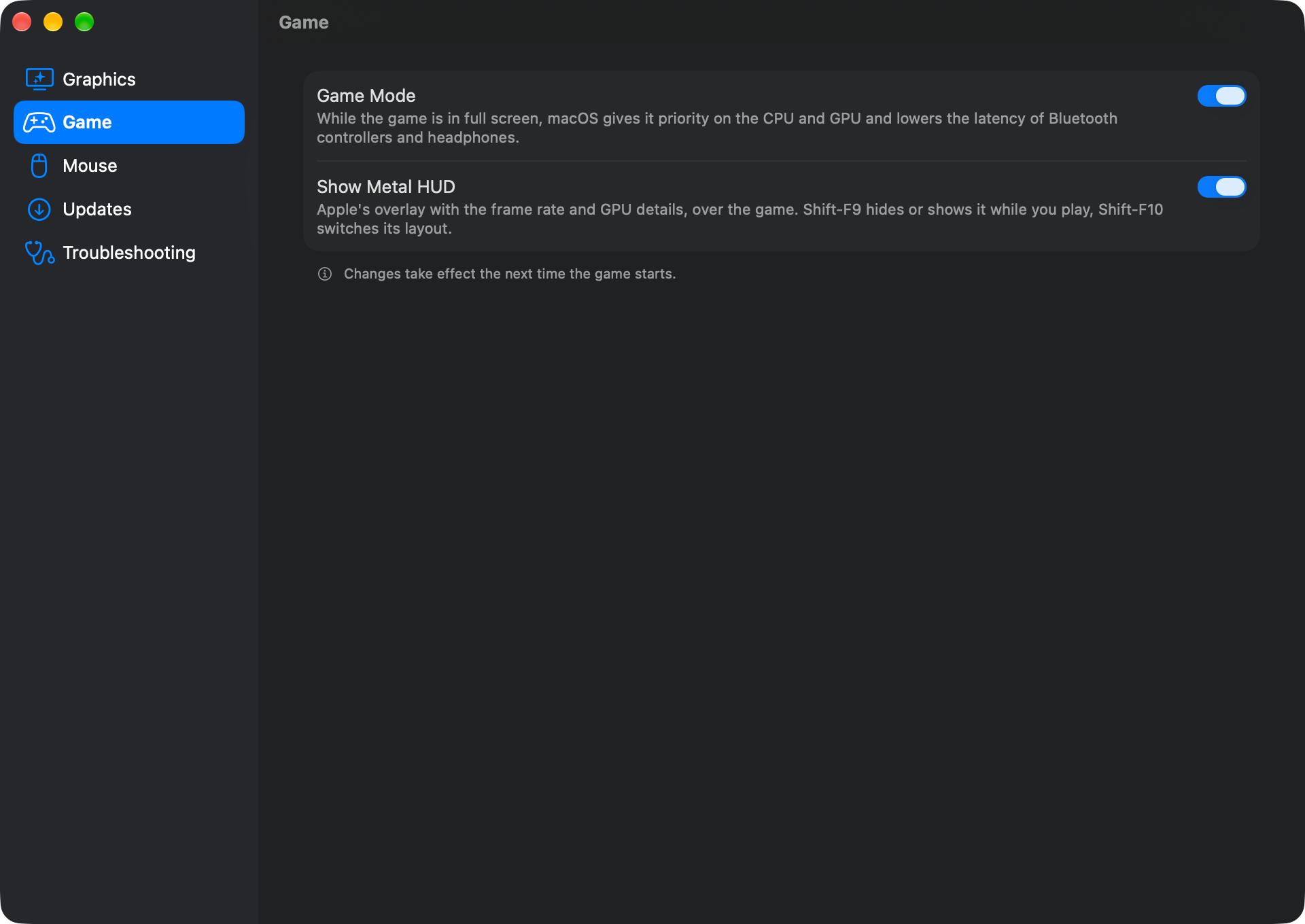
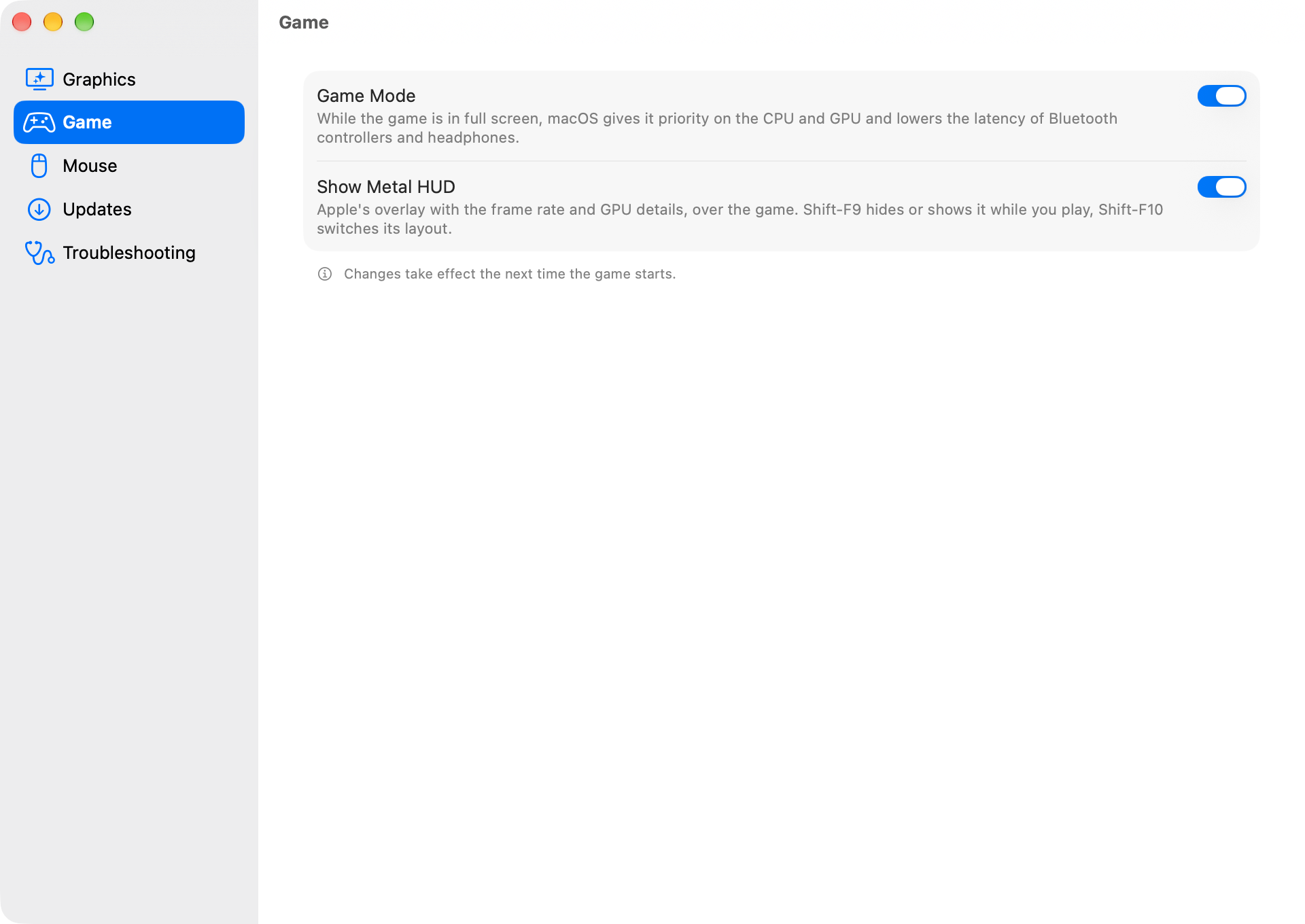
SWGL on Mac · settings › game
The SWGL on Mac Settings window, on the Game page

Advisory · Rosetta

Don't upgrade a Mac you play on to macOS 28 yet

Works on macOS 26 and 27 and installs Rosetta for you if it's missing. From macOS 28, Apple keeps Rosetta only for certain older games, so stay on 26 or 27 until a release here says macOS 28 works.

  • macOS 26: play
  • macOS 27: play
  • macOS 28: hold

System requirements

Chip
Apple Silicon, M1 or later
macOS
26 or later
Rosetta
Installed for you if missing
Disk
About 10 GB free for the game

Capabilities · 06 modules

  1. Direct3D 9 → Metal

    d9mt sends the game's Direct3D 9 straight to Metal.

  2. macOS Game Mode

    In full screen, macOS puts the game first on the CPU and GPU and cuts Bluetooth latency.

  3. Retina rendering

    The game renders at your display's full resolution instead of being upscaled.

  4. Updates itself

    It checks once a day and installs a new version when you click Install, never in the middle of a game.

  5. Collect Logs

    One click saves a zip for a bug report, without your account name or password.

  6. Official launcher

    You log in to the official SWG Legends launcher, and it installs and updates the game as on Windows.

Launch sequence · 3 steps

  1. Download the .dmg

    Drag SWGL on Mac to Applications.

  2. Open SWGL on Mac

    It downloads the official SWG Legends launcher.

  3. Log in

    The launcher installs the game, about 10 GB.

Is it safe?

I'd rather show you than just say yes. Both apps change the layer between the game and your Mac and leave the game itself alone. They're also unofficial, so you use them at your own risk.

FACTS
4
GAME FILES
UNCHANGED
LICENCE
ZLIB
  1. Not a game mod

    Neither app edits the game. They change how your Mac runs and draws it, with d9mt turning Direct3D 9 into Metal, and leave the game client as it ships.

    GAME FILES
    UNCHANGED
    MEMORY
    UNTOUCHED
    NETWORK
    UNTOUCHED
    • SWTOR
    • SWGL
  2. Signed & notarized

    I sign every release with my Developer ID and Apple notarizes it, so macOS can check where it came from before it opens.

    DEVELOPER ID
    SIGNED
    APPLE
    NOTARIZED
    • SWTOR
    • SWGL
  3. Open source

    The code is on GitHub under the zlib licence. Bundled parts like d9mt and Wine keep their own licences. Read it, build it yourself or fork it.

    • SWTOR
    • SWGL
  4. Fully reversible

    Uninstall in SWTOR on Mac puts the official SWTOR app back exactly as Broadsword ships it and copies your game settings back. SWGL on Mac has nothing to undo, because it keeps the game and everything else in its own folder.

    • SWTOR
    • SWGL: not applicable

Questions before the jump

Is this allowed?

Both apps run the official games. SWTOR on Mac starts the official SWTOR Mac app, and SWGL on Mac installs the official SWG Legends launcher. Game files, memory and network traffic stay as they are. What changes is how your Mac runs and draws the game.

They are still unofficial fan projects. Neither Broadsword nor the SWG Legends team endorses them, and you use them at your own risk.

See fact 01 · not a game modUnofficial

Will I get banned?

I can't promise you won't, and nobody else honestly can either. What I can tell you is that neither app is a game mod. They don't touch the game's files, memory or network traffic, and they run the official clients.

They're still unofficial. Broadsword doesn't support third-party tools or compatibility layers, and SWG Legends doesn't support clients that don't come from them. There's no guarantee, so it's your call.

See fact 01No guarantee

Does it work on Intel Macs?No · Apple Silicon only

No. Both apps need an Apple Silicon Mac, M1 or later, on macOS 26 or later.

What about macOS 28?Hold · don't upgrade yet

SWGL on Mac runs the game in an Intel Wine, so it needs Rosetta, and from macOS 28 Apple keeps Rosetta only for certain older games. A macOS 28 version is planned in issue #20. Until I announce it, don't upgrade a Mac you play on.

SWTOR on Mac needs Rosetta too, like the official SWTOR Mac app it runs on. I don't know yet how either of them will do on macOS 28.

Tracked in swgl-on-mac #20Planned

Still stuck? Ask me on Discord or open a GitHub issue. Please don't contact Broadsword, SWTOR support or the SWG Legends team about these apps.

Release log

Both apps on one timeline, newest first. The latest release of each app is open and the older ones are folded. Development builds don't show up here.

Current stable builds

SWTOR on Mac
Version 0.0.6
SWGL on Mac
Version 0.0.4
  1. SWTOR0.0.6Latest SWTOR

    SWTOR on Mac 0.0.6

    Less GPU memory traffic, a new Settings window, and better logs for bug reports.

    • Less GPU memory traffic (d9mt 68c7190). The graphics driver no longer reads and writes every render target in full for every part of a frame when it doesn't have to. That saves roughly 0.6 to 1 GB of memory traffic per frame in busy scenes. It helps most on M1, M2 and M3 Macs with high shadow quality or anti-aliasing. The game looks exactly the same.
    • A new Settings window. A sidebar lists the sections (Graphics, Game, Keyboard, Play Button, Updates, Troubleshooting), as in System Settings. The window fits on any screen, can be resized, and opens on the section you used last. Every setting is still there.
    • Better logs for stutter reports. With Settings > Troubleshooting > Debug Logging on, the log now records frame times, slow frames and shader compiles once a second, and Collect Logs… adds a short summary of your last game session. Leave Debug Logging off unless you're reporting a problem: it costs a little performance.

    After updating, open SWTOR on Mac and click Update to 0.0.6 in the window (with the game closed), as after every update, so the game uses the new graphics driver.

    The compiled-shader cache is kept, so there should be no extra stutter after the update. If the first few minutes in a new area do stutter, the cache is being rebuilt; that settles by itself.

    Support

    SWTOR on Mac is an unofficial project, not made, endorsed or supported by Broadsword Games, EA, Lucasfilm or Disney, and you use it at your own risk. Please send questions and bug reports to Pharaphobia on Discord or as a GitHub issue, never to Broadsword or SWTOR customer support.

    github.com/jdrly/swtor-on-mac/issues

  2. SWTOR0.0.5More video memory for the game on 8, 16 and 24 GB Macs.

    SWTOR on Mac 0.0.5

    More video memory for the game on 8, 16 and 24 GB Macs.

    • The game gets more video memory on 8/16/24 GB Macs: 2/3/4 GB instead of 1/2/3 GB (d9mt c2a819d). Textures should stay sharp in busy places such as fleet and crowded planets. Macs with more memory already got 4 GB, as the official Mac app gives.
    • Settings > Video Memory Profile says what each setting gives the game. Raise it if your Mac has memory to spare; lower it if macOS runs short of memory.
    • The compiled-shader cache is kept: no extra stutter after the update.

    Click Reinstall to update in the window, as after every update, so the game uses the new d9mt.

    Support

    SWTOR on Mac is an unofficial project, not made, endorsed or supported by Broadsword Games, EA, Lucasfilm or Disney, and you use it at your own risk. Please send questions and bug reports to Pharaphobia on Discord or as a GitHub issue, never to Broadsword or SWTOR customer support.

    github.com/jdrly/swtor-on-mac/issues

  3. SWTOR0.0.4Key binds for non-US keyboard layouts.

    SWTOR on Mac 0.0.4

    Key binds for non-US keyboard layouts.

    • New in Settings, Keyboard > Game keys by keyboard position (off by default). On a Czech, French or other layout whose number row doesn't type digits, the game showed key binds and action bars as + ě š č ř ž ý á í é or & é " ' (. Turn this on and the game sees every key by its position on a US keyboard: the number row is 1–0 in key binds and action bars. Typing in chat still uses your layout (ě š č with Czech, dead keys and Shift included).
    • Settings points it out when your current layout's number row doesn't type 1–0.
    • It changes binds on QWERTZ layouts (Czech, German) too: the key labelled Z is Y in the game, and the other way round, because a US keyboard has Y there.
    • How: a build of Wine's Mac driver (winemac.so) with a new option, from CodeWeavers' CrossOver 24.0.7 sources and a small patch (LGPL, in the repository under patches/). It is used only while the setting is on; otherwise the engine keeps its own driver.

    Change it with the launcher and the game closed. The setting installs the driver itself, so it works without a Reinstall; Reinstall to update in the window, as after every update, brings the rest of the installed setup to 0.0.4.

    Support

    SWTOR on Mac is an unofficial project, not made, endorsed or supported by Broadsword Games, EA, Lucasfilm or Disney, and you use it at your own risk. Please send questions and bug reports to Pharaphobia on Discord or as a GitHub issue, never to Broadsword or SWTOR customer support.

    github.com/jdrly/swtor-on-mac/issues

  4. SWTOR0.0.3A Play button.

    SWTOR on Mac 0.0.3

    A Play button.

    • Play SWTOR, the big button in the window once SWTOR on Mac is installed (and at the end of an install), opens the official SWTOR app, so you can start right away. If the launcher or the game already runs, it brings it to the front instead (Show SWTOR Launcher).
    • It is off, with the reason under it, while the official app is missing, the launcher hook needs a repair, or an install or uninstall runs.
    • New in Settings: Quit SWTOR on Mac after launching (off by default).

    Support

    SWTOR on Mac is an unofficial project, not made, endorsed or supported by Broadsword Games, EA, Lucasfilm or Disney, and you use it at your own risk. Please send questions and bug reports to Pharaphobia on Discord or as a GitHub issue, never to Broadsword or SWTOR customer support.

    github.com/jdrly/swtor-on-mac/issues

  5. SWTOR0.0.2Clearer wording of the notice; no functional changes.

    SWTOR on Mac 0.0.2

    Clearer wording of the notice; no functional changes.

    • The notice (before you install, and behind the Unofficial community project badge) now says plainly what SWTOR on Mac is: not a game mod. It doesn't change the game's files, memory or network traffic; it only replaces the compatibility layer the official Mac app already runs on (Wine, plus d9mt for Direct3D 9 on Metal).

    Support

    SWTOR on Mac is an unofficial project, not made, endorsed or supported by Broadsword Games, EA, Lucasfilm or Disney, and you use it at your own risk. Please send questions and bug reports to Pharaphobia on Discord or as a GitHub issue, never to Broadsword or SWTOR customer support.

    github.com/jdrly/swtor-on-mac/issues

  6. SWTOR0.0.1First test version.

    SWTOR on Mac 0.0.1

    First test version.

    • Installs SWTOR on Mac on top of the official SWTOR Mac app: d9mt (Direct3D 9 on Metal) on CrossOver 24.0.7 Wine, macOS Game Mode, Retina mode, the mouse-look fix.
    • Settings (⌘,): Retina mode, vsync, video memory profile, Game Mode, Metal HUD, debug logging.
    • Updates itself (Check for Updates…), and the game's start looks for a new version once a day.
    • Hooks itself back in when the official launcher updates its Wine.
    • Collect Logs… for bug reports, without account names or passwords.
    • Uninstall restores the official app exactly as Broadsword ships it and copies your game settings back to it.

    The first minutes of play (and each new area or effect seen for the first time) may stutter while shaders are compiled and cached; it gets smooth after that. After an update of SWTOR on Mac the cache is rebuilt once.

    Support

    SWTOR on Mac is an unofficial project, not made, endorsed or supported by Broadsword Games, EA, Lucasfilm or Disney. Please send questions and bug reports to Pharaphobia on Discord or as a GitHub issue, never to Broadsword or SWTOR customer support.

    github.com/jdrly/swtor-on-mac/issues

  7. SWGL0.0.4Latest SWGL

    SWGL on Mac 0.0.4

    Rosetta installs itself when it's missing.

    Rosetta installs itself

    • SWGL on Mac needs Rosetta, Apple's translation for Intel apps, to run the game, and updating to macOS 27 removes it. Without Rosetta, 0.0.3 and earlier stopped with "Could not initialise Wine".
    • Now SWGL on Mac installs Rosetta by itself when it's missing: during the first setup, or with a short notification the next time you open the app. Installing it accepts Apple's Rosetta licence.
    • If it can't be installed, for example without an internet connection, macOS offers its own install dialog, and SWGL on Mac tells you what went wrong in plain words.

    Support

    SWGL on Mac is an unofficial project, not made, endorsed or supported by the SWG Legends team. Please send questions and bug reports to Pharaphobia on Discord or as a GitHub issue, never to the SWG Legends team.

    github.com/jdrly/swgl-on-mac/issues

  8. SWGL0.0.3On macOS 26 the game shows up again instead of a black screen.

    SWGL on Mac 0.0.3

    On macOS 26 the game shows up again instead of a black screen.

    macOS 26: the game shows up again

    • On macOS 26, 0.0.1 and 0.0.2 opened the game to a black screen with only the cursor and sound. Some of the graphics driver's built-in shaders were made only for macOS 27, and macOS 26 refused them. They now come in a macOS 26 version too, and the game draws normally there.
    • Nothing changes on macOS 27: it keeps using the newer shaders.

    Updating from 0.0.2: SWGL on Mac offers the update by itself within a day, or choose Check for Updates… in the SWGL on Mac menu. Coming from 0.0.1, download this version once and drag it into Applications.

    Support

    SWGL on Mac is an unofficial project, not made, endorsed or supported by the SWG Legends team. Please send questions and bug reports to Pharaphobia on Discord or as a GitHub issue, never to the SWG Legends team.

    github.com/jdrly/swgl-on-mac/issues

  9. SWGL0.0.2Smooth mouse-look, a steadier frame rate, a Settings window and automatic updates.

    SWGL on Mac 0.0.2

    Smooth mouse-look, a steadier frame rate, a Settings window and automatic updates.

    Coming from 0.0.1? Download this version once and drag it into Applications, replacing the old one. 0.0.1 can't update itself; from 0.0.2 on, updates come to you.

    Smooth mouse-look

    • Turning the camera with the mouse is now smooth: no more judder that came and went with ⌘-Tab or after a stutter. The app now reads your mouse directly and passes every movement to the game right away.
    • New: Mouse-Look Speed in Settings. 1× turns as fast as SWG on Windows; your macOS pointer speed no longer applies. If mouse-look feels slower than in 0.0.1, raise it or the in-game sensitivity (in testing, about 1.75× matched 0.0.1).

    Steadier frame rate

    • After a hitch, the game no longer gets stuck at 30 fps for a second or two on 60 Hz displays.

    Settings and updates

    • SWGL on Mac → Settings… (⌘,) replaces the Features menu: Retina Mode, Metal HUD, Game Mode, Mouse-Look Speed, Debug Mode and updates in one window.
    • Automatic updates: from this version on, SWGL on Mac checks for new versions once a day (never while you're playing) and installs them when you click Install. You can turn the check off in Settings, or use Check for Updates… in the SWGL on Mac menu.
    • The About panel and alerts now look like a current macOS app.

    Troubleshooting

    • Collect Logs… in the SWGL on Mac menu saves a zip of the logs to your Desktop, with personal details left out, to send with a bug report.
    • Debug Mode in Settings makes the logs much more detailed. Turn it on only when asked to.

    Requires a Mac with Apple Silicon and macOS 26 or later. Signed and notarized by Apple.

    SHA-256 of SWGL-on-Mac-0.0.2.dmg: ddad72bd6440604569ac8e20e3ee09be32be5c4a6c784abd162739e328528b51

    Support

    SWGL on Mac is an unofficial project, not made, endorsed or supported by the SWG Legends team. Please send questions and bug reports to Pharaphobia on Discord or as a GitHub issue, never to the SWG Legends team.

    github.com/jdrly/swgl-on-mac/issues

  10. SWGL0.0.1First public build of SWGL on Mac, an unofficial native macOS app for playing SWG Legends on Apple Silicon. Early beta.

    SWGL on Mac 0.0.1

    First public build of SWGL on Mac, an unofficial native macOS app for playing SWG Legends on Apple Silicon. Early beta.

    Install

    1. Download SWGL-on-Mac-0.0.1.dmg below, open it and drag SWGL on Mac into Applications.
    2. Open it. A welcome window downloads the official SWG Legends launcher from swglegends.com and prepares everything (about a minute).
    3. Log in. The launcher installs the game and keeps it up to date.

    Requires a Mac with Apple Silicon and macOS 26 or later (developed on macOS 27). Signed and notarized by Apple.

    What's in it

    • The official launcher, running natively, with About, Open SWGL in Finder and a Features menu (Retina Mode, Metal HUD, Game Mode).
    • The game on a bundled Wine with d9mt (Direct3D 9 → Metal), Retina resolution and display-paced frames.
    • Smooth mouse-look and action combat camera (patched Mac driver).
    • macOS Game Mode in full screen.
    • The launcher's saved password is handed to the game.

    Known limitations

    • Short hitches when entering new areas: the game's own loading, running translated. Being investigated.
    • The chase camera pulls in at walls (the game's camera collision). Try the in-game option Simple Camera Collision.
    • The 64-bit test client that the launcher can download for QA testers is not supported.

    All support for SWGL on Mac comes from its developer, Jan Drlý (Pharaphobia). Please send questions, bug reports and logs (~/Library/Logs/SWGLonMac) to Pharaphobia on Discord or as a GitHub issue, never to the SWG Legends team.

    Checksum

    SWGL-on-Mac-0.0.1.dmg SHA-256: f57d67c3fcd55684447cc49f860db8b202e23eca3e2837ef8aa0da80519fc80d

    Support

    SWGL on Mac is an unofficial community project. It is not made, endorsed or supported by the SWG Legends team. SWG Legends does not officially support mods or clients that don't come directly from them, so using SWGL on Mac is at your own risk, and the SWG Legends team can't help with problems it causes.

    github.com/jdrly/swgl-on-mac/issues

Stuck?
Hail Pharaphobia.

I'm Pharaphobia and I make both apps, so help comes from me, on Discord or in GitHub issues. For a bug, chooseCollect Logs… in the app first. It saves a zip with the logs, without your account name or password.

RESTRICTED FREQUENCY

Never contact Broadsword, SWTOR support or the SWG Legends team about these apps. They don't make them and can't help with them.